Stay Safe. Stay Smart. Stay Safe. Stay Smart. Stay Safe. Stay Smart.

Smart anti-theft security designed to protect your phone, privacy, and peace of mind.

Begin Tutorial

Your Digital Freedom, Protected

In a connected world, your smartphone holds your identity, memories, and personal information. Yet losing control of your device can mean losing control of your privacy. Kavach is built to change that. More than an anti-theft solution, it is your intelligent security companion—designed to protect, track, and secure your device when it matters most.

Whether your phone is misplaced, stolen, or at risk, Kavach gives you the tools to stay in control. From real-time protection to advanced recovery features, your device remains yours—secure, private, and protected.

"True digital freedom begins with knowing your device is secure."

Installation & Initial Setup

Proper configuration is critical for Kavach to function. Follow these steps precisely to arm your device. This process involves granting high-level permissions that enable the app's core security functions.

Step 1: Installation

Kavach is too powerful for the Google Play Store. You must install it manually.

  • Download the latest app-release.apk file from the project's official GitHub repository.
  • Open the downloaded APK file on your Android device.
  • You will likely need to grant your browser or file manager permission to "Install unknown apps". This is a standard security measure.
  • Follow the on-screen prompts to complete the installation.

Step 2: Granting Core Service Permissions

Upon opening Kavach for the first time, you will be greeted by the Core Services screen (PermissionsFragment). This screen is your checklist for activating the app's foundational protections. You must enable all services for the app to function correctly. Each button will take you to the relevant system settings page.

Kavach Core Services Screen

The Core Services screen is the first step to securing your device.

  • Runtime Permissions: This is the first and most basic step. It grants access to the camera, microphone, location, SMS, notifications, and more. These are essential for evidence collection and sending alerts.
  • Device Admin: This is the most critical permission. It gives Kavach the power to remotely lock the device, wipe all data, and prevent unauthorized uninstallation. Without this, the app's anti-theft capabilities are severely limited. When you attempt to disable this service later, the AdminReceiver will intercept the action and lock the device unless Maintenance Mode is active.
  • Accessibility Service: This service (PowerButtonService) monitors the system for when the power menu is opened. This is required for the Fake Shutdown feature, allowing the app to display a fake screen while remaining operational.
  • Draw Over Other Apps: This permission allows Kavach to display its secure LockScreenActivity and FakeShutdownActivity on top of any other application, including the system UI. This ensures its security screens cannot be bypassed.
  • Usage Access (Optional): This grants the advanced ThreatDetectionEngine the ability to monitor app usage patterns for anomalies, enhancing its ability to detect sophisticated threats. While optional, it is highly recommended for maximum security.

The Dashboard: Your Security Command Center

The Dashboard is the main screen of the application (DashboardFragment). It provides an at-a-glance overview of your device's security posture, potential threats, and configuration status.

Kavach Dashboard Screen

The Dashboard shows your security level, active threats, and configuration checklist.

Security Level Meter

At the top of the screen, a 5-stage progress bar and status title indicate your current security level. This score is calculated by the SecurityScoreCalculator based on which critical features and permissions you have enabled. The levels are:

  • Level 0 (Compromised): Device Admin is not active. The app is effectively useless.
  • Level 1-2 (Poor/Fair): Basic permissions are granted, but key features are disabled.
  • Level 3-4 (Good/Excellent): Most protective features are active.
  • Level 5 (Maximum): All standard security features are enabled and configured.
  • Level 6 (King Mode): Root access is detected. You have unlocked ultimate control.

Threat Assessment

This card, powered by the ThreatDetectionEngine and AISecurityOrchestrator, dynamically analyzes your device for suspicious activity. It flags potential threats such as rapid app installations, unexpected VPN usage, or anomalous data consumption, assigning a threat level from Minimal to Critical.

Security Checklist

This is a detailed list of the individual components contributing to your security score. Each item shows its status (Active/Inactive) and provides a brief description of its purpose. Use this checklist to identify and enable any remaining security features.

Core Features Arsenal

These are the primary tools at your disposal, configurable via the Authentication, Remote Control, and Features tabs in the app. They form a layered defense against theft and unauthorized access.

Kavach Features Screen

The Features screen allows you to enable and disable various security triggers.

Remote Data Destruction

Issue a remote SMS command to initiate a full data wipe, rendering the device's contents irrecoverable to adversaries.

Fake Shutdown

Intercepts the power menu, presenting a counterfeit shutdown animation while the device remains fully operational, tracking, and recording.

Duress & Wipe PINs

Unlock your device under coercion with a Duress PIN to silently trigger a high alert, or a Wipe PIN for a scorched-earth response.

Total Evidence Collection

On alert, captures front/back photos, video, ambient audio, and GPS coordinates, then emails the package to your emergency contact.

SIM Change Alert

Detects if the SIM card has been removed or replaced and immediately triggers a medium-level security alert.

Stealth Operations

Hide the app icon from the launcher. Access is granted only by dialing a secret code, leaving no trace of its existence for unauthorized users.

Multi-Level Authentication

Configure three distinct PINs in the Authentication tab (PinsFragment) for different scenarios. The LockScreenActivity will react based on the PIN entered.

  • Normal PIN: Safely unlocks the device.
  • Duress PIN: Unlocks the device but silently triggers a HIGH severity alert.
  • Wipe PIN: Unlocks the device but triggers a CRITICAL severity alert and initiates a full device wipe.
Kavach Authentication Screen

Intruder Selfie

When enabled, the app logs failed unlock attempts. After 3 or more failures, it triggers a MEDIUM severity alert, activating the PanicActionService to discreetly take a photo using the front camera.

Fake Shutdown

Requires the Accessibility Service. When a user tries to open the power menu, Kavach intercepts it and displays a convincing fake shutdown screen (FakeShutdownActivity). The device appears off but remains fully active, sending alerts and evidence.

SIM Change Alert

The SimChangeReceiver constantly monitors the device's SIM card serial number. If it is changed or removed, a MEDIUM alert is triggered, notifying you of potential theft.

Shake to Panic

When enabled, the MonitoringService uses the accelerometer to detect vigorous shaking. This triggers a HIGH severity panic alert, useful for situations where you cannot interact with the screen.

Stealth Mode

Hides the application's icon from the launcher by disabling its activity-alias. The app can then only be opened by dialing a secret code (e.g., *#*#1234#*#*) which is detected by the SecretCodeReceiver.

Watchdog Mode

A periodic "proof-of-life" service. The WatchdogWorker runs at a configured interval (e.g., every 30 minutes) and sends a status update with battery and location information to your emergency contact. This confirms the device is still operational.

Data Destruction Tripwire

An extreme security measure. If the device fails to connect to the internet for a pre-defined duration (e.g., 24 hours), the TripwireWorker assumes the device is captured and offline. It will trigger a CRITICAL alert and initiate a full device wipe.

Safe Zone Geofence

Set a geographical "safe zone" (e.g., your home). If the device leaves this area, the GeofenceBroadcastReceiver will trigger a LOW severity alert, notifying you that the device is on the move.

King Mode: Root-Exclusive Dominance

For those who refuse to compromise. Root access unlocks Kavach's most potent, system-level capabilities, managed in the Features tab. These actions, executed by RootActions.kt, operate below the standard Android framework, offering unparalleled persistence and control. Warning: Use of these features is for advanced users and assumes all legal and ethical responsibility. Misuse can permanently damage your device.

Survive Factory Reset

Flashes a loader to the recovery partition, enabling Kavach to be re-downloaded and re-installed automatically after a factory reset. The ultimate persistence.

System App Conversion

Installs the application into the `/system/priv-app` directory, making it a core part of the OS and immune to standard uninstallation methods.

Unkillable Service

Deploys a root-level `init.d` script that continuously ensures the monitoring service is running, restarting it instantly if it's ever terminated.

Kernel-Level Keylogger

Directly reads input events from the kernel using `getevent`, capturing all keystrokes before they even reach the Android framework. Logs can be remotely exfiltrated.

Stealth Screenshot

Utilizes the `screencap` command-line utility to capture the screen contents silently, bypassing all notifications and privacy indicators.

App Data Exfiltration

Breaches the Android sandbox to directly access and copy files from other applications' private data directories (e.g., chat databases, tokens).

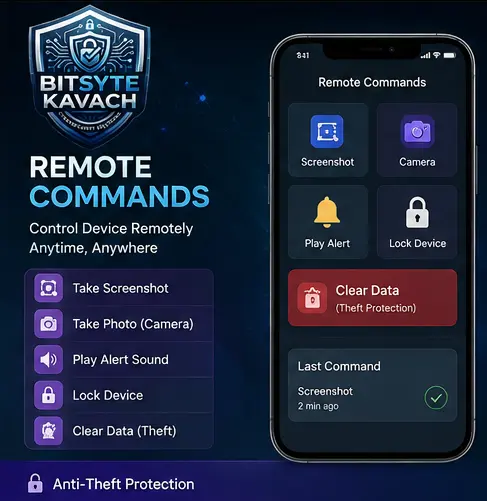
Remote Command & Control

Kavach can be fully controlled via SMS commands, processed by the SmsCommandReceiver. Configure your emergency contact and a master password in the Remote Control tab.

Kavach Remote Control Screen

Configure your emergency contact and master password for SMS commands.

Setup

  1. Emergency Contact: Enter a phone number or email address. Alerts will be sent here. If a phone number is used, only basic text alerts can be sent. For full evidence packages (photos, videos, audio), an email address is required.
  2. SMS Command Master Password: Set a strong, unique password. This password is required to authenticate every remote command, preventing unauthorized control of your device.
  3. Email Credentials: For email alerts, you must provide the SMTP server details for a sender email account. It is highly recommended to use an "App Password" for services like Gmail, not your main account password.

SMS Command Syntax

Send an SMS to the device with the following format. Commands are not case-sensitive. Replace [password] with your actual master password.

KAVACH [COMMAND] [ARGUMENTS] [password]

Available Commands

  • LOCK: Immediately locks the device screen.
    KAVACH LOCK mySecretPass123
  • SIREN: Triggers a HIGH severity alert and plays a loud siren.
    KAVACH SIREN mySecretPass123
  • WIPE: Triggers a CRITICAL alert and initiates a full device data wipe.
    KAVACH WIPE mySecretPass123
  • SCREENSHOT (Root): Takes a stealth screenshot and emails it to the emergency contact.
    KAVACH SCREENSHOT mySecretPass123
  • GETLOGS (Root): Emails any captured keylogger data to the emergency contact and clears the log.
    KAVACH GETLOGS mySecretPass123
  • EXFIL (Root): Exfiltrates a specific file from another app's data folder and emails it as an attachment.
    KAVACH EXFIL com.whatsapp databases/msgstore.db mySecretPass123

Legal & Ethical Disclaimer

This application is designed for educational and defensive security purposes ONLY. Features like stealth operations, remote data access, and data destruction carry significant ethical and legal responsibilities. Never install or use this application on a device without the owner's explicit and informed consent. Unauthorized use is strictly prohibited and may lead to severe legal consequences. The developer assumes no liability for any misuse of this software.